
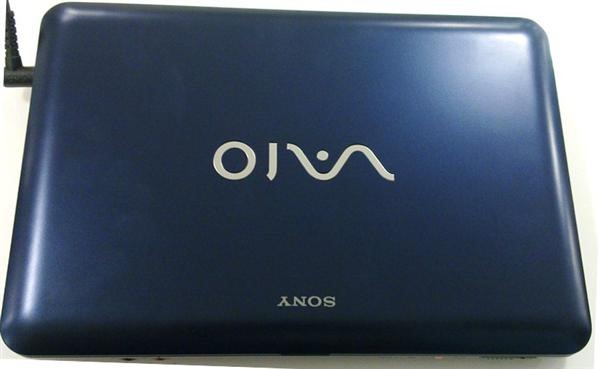
Sony Vaio M Review
Sony is the maker of famous ultraportables or shall we say expensive ultraportables. But, with its Vaio M netbook, for the first time, we are looking at Sony showing peculiar affection towards the budget netbook market. The Vaio M is a brave attempt by Sony to eat a small piece of the already over-saturated 10-inch netbook form factor.

Build
Sony Vaio M has rounded corners and from a distance looks quite like the Sony Vaio W. It looks expensive and avoids cheap appearance of the 10-inch netbook category. The Sony Vaio M comes in three colors – pink, blue and white, all look pleasing to the eyes.
Even though it is budget netbook, it does not show any signs of cheap construction anywhere. It is robust and well made and can take some beating too. The lid and the silver chassis has a matte finish and thus has inversion to fingerprints.
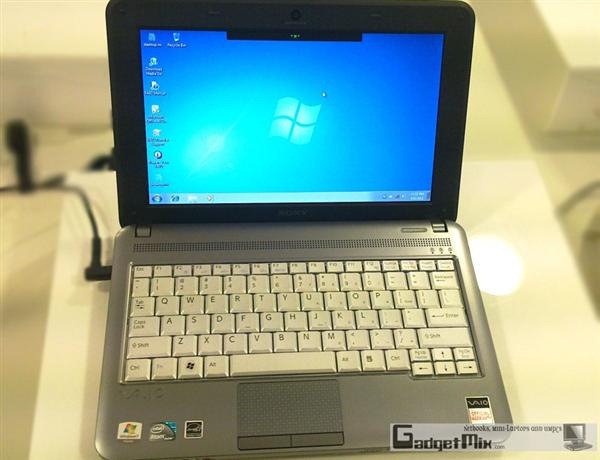
Click on any picture to see bigger image
All the USB ports are grouped to the right of the device. A big USB device can occupy the space for other USB ports. We recommend using a USB extension cable when using a big USB device.
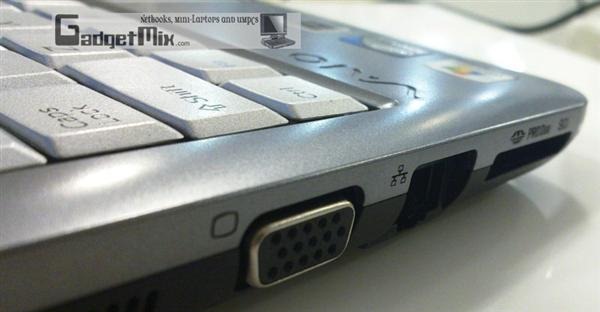
Other ports are present on the left side – power port, VGA port, LAN and SD/memory stick reader.
Display
Its 10.1-inch screen has much better saturation levels and color reproduction than most of the netbooks we have tested so far. Compared to the Vaio W, the resolution has been reduced to 1024×600 pixels. But, we love the fact that it is matte in nature and we had no issues using it in bright light.
Performance
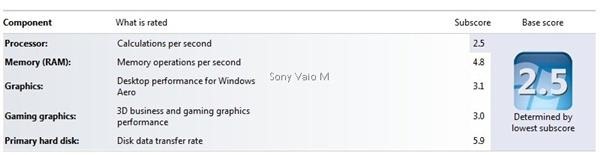
As expected from a budget netbook, the Sony Vaio M’s specs did not set our pulse racing. It has an Intel Atom N470 1.83GHz processor, which runs at a higher clock speed than the Atom N450 processor. But one shall not take higher clock speed as a litmus test while judging the performance. The capabilities are still limited to basic office work and web-surfing. Do not even think of playing a HD video on it, unless you are in a mood to watch a slideshow of the movie. :) Perhaps that tells the story why there is no HDMI onboard.
The battery life is average at best – running for about five hours on a single charge. This is half of what other netbooks in the same category are getting.
Vaio M comes with a roomy 250GB hard disk which should be good enough for storing plenty of movies, photos and songs. It also has built-in multi card slot which accepts both memory stick and SD card
Keyboard
The keys are surprisingly not chiclet and we found the keyboard to be a bit cramped, just like the Acer Aspire netbooks. Compared to the Vaio P and W, we found ourselves typing at a slower rate. We feel that the Sony could have made better use of the limited space it had for the keyboard. The keyboard could have been end-to-end, but it wastes half inch from both the sides. But, if are you planning to just edit documents on this netbook, go ahead and buy it.
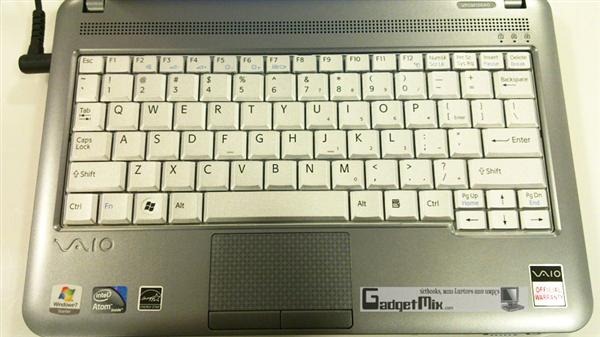
The trackpad is fine and we had no problems working with it. The keys on the trackpad though require a firm press to register a click, just like Asus netbooks out there.
Verdict
The Vaio M, 33mm high, is not sleek like other Vaio netbooks. Almost any netbook with a 6-cell battery will surpass the Vaio M in terms of runtime with no difference in performance. So, it all comes down to this – if you have been waiting to own a Sony Vaio, but could not afford until now, step outside and get this. If you are a serious netbook user, get any netbook with a 6-cell battery and you will be much more happier.
+ memory card slot accepts both memory stick and SD card
+ Sony Vaio with a cheap price tag
+ Amazing display
+ Good build quality
- 1GB RAM. 2GB would have made the device snappier.
- No HDMI
- no chiclet keyboard
- so-so battery life (compared to other 6-cell netbooks)
update – Now available at J&R. Get it!
No related posts.
Sign up to the Gadgetmix Newsletter (free) for news and reviews mailed directly to your mailbox CLICK HERE


Good review. Which one do you recommend – Vaio W or Vaio M? And are you sure that N470 is not faster than earlier Atom generations?
It is available in pink? Too bad you got the blue one for review.
@ Dalton – I would go for the Vaio W with the 6-cell battery. I love the chiclet keyboard. Also, as I said in the review, there is no difference in performance of this CPU and N450, N280 or even N270
Very cool laptop battery, i like it and want to buy one
Sony laptops are know for style and comfortableness. The M series is excellent. It looks good and easy to carry. But it is not that good as Dell for better performance.
Good review. Would you recommend it for college?
the details and pictures is very clear. nice laptop
Is it possible to upgrade RAM to 2gb?
Ben – There is no way to upgrade the RAM easily. Well, that is typical SONY. They glued the RAM in case of VAIO P and Vaio X :(
@Kamal – does the Vaio M have an extra so-dimm slot? I understand that there’s no removable contraption on the bottom. It would be enough to know that RAM could be upgraded perhaps through the Sony Service Center so as not to void warranty.
My uncle unwittingly installed Win 7 Ultimate in his Vaio M…Can he still use the unit? What problems could arise and how can they be remedied? Thanks for the info!
Ben, you or your uncle would not face any slowdowns, thanks to wise use of RAM in Windows 7.
Regarding the extra so-dimm slot, yes, there should be one. This was the review unit I got from Sony and even though I unscrewed the screws, it seemed as if the unit is glued to prevent the end-user to himself upgrade the RAM
Ben – Take a look at this – RAM upgrade is actually possible – http://gadgetmix.com/netbook/sony-vaio-m-dissected/
Thanks Kamal! You’ve been very helpful.
That is kick as*!
how can i change the desktop background of my sony vaio window 7?
@ Rhea – The only way is to upgrade to Windows 7 Basic/Home Premium/Professional/Ultimate OS
I bought a sony vaio M(126AG)netbook on 6th this month. With Atom N470 1.83GHz processor,2GB RAM,320GB HDD it has amazing display quality, doesn’t slow at all. Overall battery life 6hrs. It can run even HD video (1920*1080) extremely smooth with windows media player, still it has resolution 1024*600 only. Currently I’m running Adobe photoshop7, Google earth, vlc player, real player & so many games without any problem. Believe me this mini laptop is almost compareble to its predessor notebook in all aspect.
The price in Indian market is 22900 Indian Rupee or $530 approx.
Avijit – Thanks for sharing your views about the netbook. I am sure it will help other users to in choose the right netbook for themselves.
i also got d sam laptop 2day only btt its nt giivn me ne bak up of mor thn 2-3 hrs thn..is ma piece defectiv or wat?i shud replac it or do wat??
Sakshi – since the unit comes with 3-cell battery, the runtime you are getting is correct. Sony does not sells the unit with 6-cell battery AFAIK
sakshi khorana says:
i also got d sam laptop 2day only btt its nt giivn me ne bak up of mor thn 2-3 hrs thn..is ma piece defectiv or wat?i shud replac it or do wat??
——————————-
Kamal DS says:
Sakshi – since the unit comes with 3-cell battery, the runtime you are getting is correct. Sony does not sells the unit with 6-cell battery AFAIK
—————————–
Dear Kamal DS please go to the sony vaio India website & check product info of M series netbook; Its 6 cell battery now that they are providing.
Clicky: http://www.sony.co.in/productcategory/it-pc-series-vpcm#IT+PC+Series+VPCM
Dear sakshi khorana
The battery can last not less than 6hrs if u run in power saving made & adjust screen brightness to 20%. I’ll tell u that power saving mode definitely don’t slow your netbook in any noticeable way. I’ve few friends using differant netbooks like HP mini, Dell Inspiration mini, Toshiba, Acer aspire mini; but none of them are getting battery life over 8hrs even in power saving mode. These netbook makers so often claim 10-12hr battery life. Remember most of them mentioned above are on Win xp Home,1GB RAM, 160 GB HDD. Win7 definitely consume more power than xp.
just read ur review —on Sony (Vaio M Review)
I must say –very prescise –crystal clear –that just ur status simble –i would not want then to own a sony Vaio –i`m my hard earn cash after a long time on my own self –i do want value for what its worth
–& clearly as i quote you ” The battery life is average at best – running for about five hours on a single charge. This is half of what other netbooks in the same category are getting. ” –VERDICT “The Vaio M, 33mm high, is not sleek like other Vaio netbooks. Almost any netbook with a 6-cell battery will surpass the Vaio M in terms of runtime with no difference in performance. So, it all comes down to this – if you have been waiting to own a Sony Vaio, but could not afford until now, step outside and get this. If you are a serious netbook user, get any netbook with a 6-cell battery and you will be much more happier.”
PLEASE KINDLY DO HELP ME –AS I`M NOT BRAND CONCISOUS ; I WANT A SLEEK MODEL ; EASY TO CARRY AROUND ; LOND BATTERY LIFE –SO THAT I JUST HARDLY HAVE TO CHARGE IT SO OFTEN ; AND YES I `M SERIOUS –WANT A GOOD SOLID 6-CELL BATTERY WHICH WOULD MAKE ME HAPPY ???
BUT WHICH ?? ??
thnx for d rply!!!bt nw d prob izz ma laptop iz wrkin slowly n i guess it has got sm virus!!!its a brnd new piece n if i format it?does it affect ma netbook??n wat to do in order to chang its background??ne kindaa altrnate
Sakshi, you can safely format it. I am not sure if there is a recovery partition though.
PS: Please don’t use SMS-style of writing
ya sure!!!and what should i do to change the background of ma laptop??
Sakshi, the best way to get that functionality would be to upgrade to at least Windows 7 Home Basic version. Microsoft does not allow changing wallpaper in Windows 7 Starter OS
I also bought a M126AG. Its nice. But i wanted ask you that is there any problem if i change the os to win 7 home basic ??
Hi Lithin. There would be absolutely no problems if you change the OS to Windows 7 Basic
Thank you very much Kamal for your fast reply.
Installed windows 7 ultimate.
No problem at all.
Windows aero is working smoothly.
Those who want to change desktop background in win7 starter simply just type ‘oceanis background changer for windows 7′ & search with google. There are large numbers of free softwares to change background.
Thanks for sharing your ideas in this article. The other thing is that any time a problem takes place with a computer motherboard, people should not take the risk connected with repairing that themselves because if it is not done properly it can lead to permanent damage to the whole laptop. It will always be safe just to approach any dealer of that laptop for the repair of that motherboard. They’ve technicians that have an competence in dealing with notebook computer motherboard problems and can make right diagnosis and accomplish repairs.