Asus 1018p review
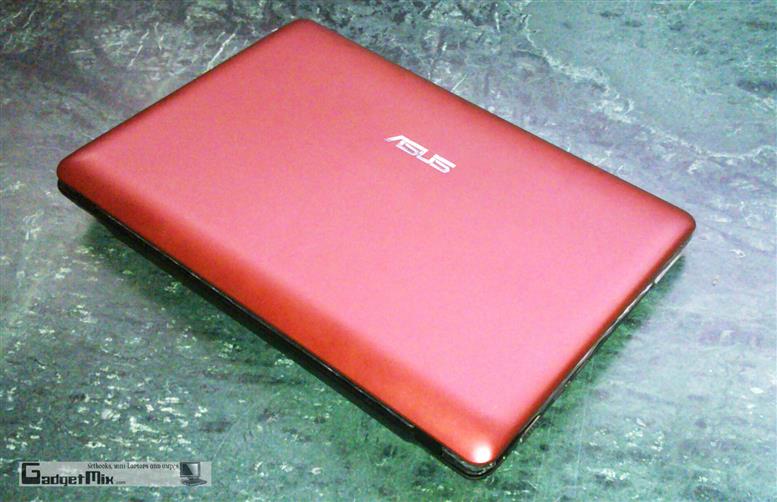
The Asus Eee 1018p is a netbook that packs every single feature that one would want in a netbook. It looks impressive and expensive; has gorgeous exterior, aluminum enclosure, magnetic latch and many more exiting features and it does not compromise on performance too! Read the review to find more about this modestly equipped netbook
(Click == Big)
First let us take a glance at the specs of my review unit, shall we?
* Intel Atom N475 1.83GHz processor
* Windows 7 Starter 32-bit OS
* 2GB RAM
* 250GB HDD, 5400rpm
* 10.1-inch WSVGA display
* Intel GMA 3150 chipset
* Fingerprint Scanner
* 3x USB 3.0 ports
* USB charger function (1xUSB only)
* Bluetooth 3.0
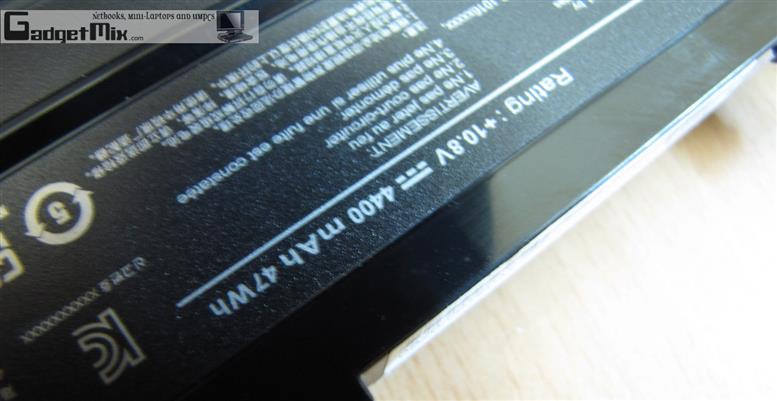
* 6000mAh 44Wh battery
Build and Design
From outside, the Asus Eee 1018p looks very sleek and sports a brushed-metal lid. The brushed-metal can be found on the palmrest too. The netbook has an aerodynamic look that gives the illusion that the netbooks is thinner than what it exactly is. This also gives it an expensive look.

The design includes multitudinous cool elements, including the drop-down flap for Ethernet, glowing LEDs at the bottom of the lid and island-style keyboard, more popularly known as the ‘chiclet keyboard’. Battery rests right under the keyboard and does not protrudes out. The bottom is made from solid plastic.
Display
The display is just like another other netbook – 10.1-inch, 1024×600 pixel resolution and glossy. Asus is not even offering an HD option for this. The display is illuminated evenly due to LED backlight.

However, it is not flushed with the bezel.

Performance
The Asus Eee 1018p relies on the Atom N475, which is the top-of-the line single core processor and is hair faster than the Atom N455. This processor runs at 1.83GHz clock speed.
System Information -

![]()
The performance is not much different from a netbook with N270 processor (note – do not take the OpenGL performance into account as that netbook came with ION)
A netbook with the now-old AMD Neo MV-40 runs much faster and handles multitasking better too.

Also, the 1018P simply refused to run the OpenGL test. I also ran the 3D Mark 2001 SE to check out its CPU and graphics performance. The bar speaks for itself.

Clearly, this netbook is not meant for gaming (unless you are into very simple 3D games), but for normal daily activities like web-browsing, typing documents, listening to music and playing back locally stored 720p videos. 720p Youtube video would not smoothly and running a 1080p video on it would be a crime.
If gaming matters to you, go for the very potent Alienware M11x R2.
Here are WEI scores.

Speed of the HD is decent. Compared to the Asus Eee 1201T, it scored just the same numbers.

Storage and Memory
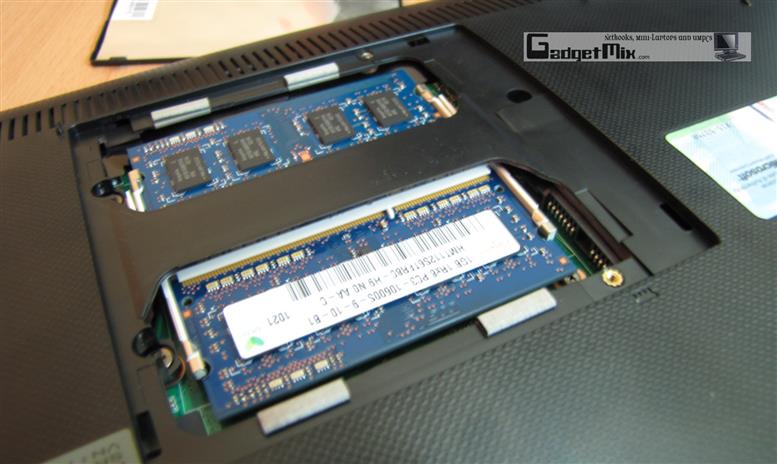
The netbook came with 250GB 5400rpm HDD together with 2GB RAM – the max you can install in an Atom netbook. The RAM can be replaced by taking the battery out and pulling the RAM door up.
(Click == Big)
Replacing the HDD is beyond the capability of an average Joe. However, it is not impossible. Update – we now have the instructions on how to change the HDD. See this post for more instructions
Keyboard
The keyboard is nice with island-style keys. The keys are slightly smaller than the Asus 12-inch netbooks, but still very much comfortable to type-on. 
The touchpad is quite spacious and has integrated left and right click buttons which work well, but I would still prefer dedicated left and right mouse buttons on a netbook.

Here is how the Asus Eee 1018p compares to the Vaio P’s keyboard
(Click == Big)
..and to the Asus Eee 701 (yep, a modded Asus 701)
(Click == Big)
Ports
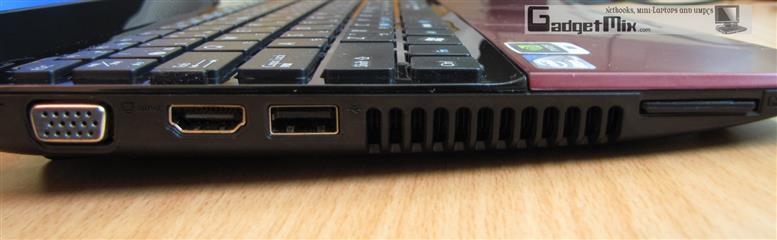
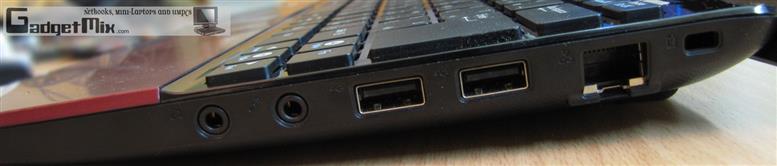
The Asus Eee 1018p is one of the first netbooks to embrace the USB 3.0 standard. The ports are blue in color that indicate that the ports have USB 3.0 connectivity. Unfortunately, I do not currently own any USB 3.0 device to test the enhanced data transfer speeds.
(Click == Big)
USB port placed on the left of the unit can be used to charge stuff like mobile phones, including iPhones and iPods even when the netbook is in sleep mode or turned-off.

There is no HDMI out on this netbook and there is clearly no need for one as there is no ION or Broadcom HD chip inside.
(Click == Big)
The 0.3MP webcam also has a privacy switch. The quality is mediocre for a webcam. For some reason, the included webcam app, CyberLink Youcam refused to take pictures over QVGA resolution.
Fingerprint reader
This is the first Asus netbook to feature a fingerprint reader and it worked like a charm. TrueSuite handles this department.

Speakers
The speakers are located on the hinge and produce fairly loud sound. The treble is too prominent and basses do not exist.
Software
It runs Windows 7 Starter OS and comes with a pile of bloatware software. I removed the annoying antivirus (cannot recall its name) and some of the Asus utilities that kept annoying me to register the netbook and update their Vibe software.
I liked the inclusion of the Times Reader – an Adobe Air app for reading the NYT. Works well.

Another nifty utility is the Syncables desktop SE which is an app based on the idea that no matter which computer on your network you decide to use, any of the others will also be updated your changes.
Battery Life
Asus bundles an excellent utility called Super Hybrid Engine that allows you to locks the CPU clock speed to 1.3GHz in power-saving mode. This allows you to get amazing battery runtimes and perhaps then you can touch the Asus’ claimed 8.3 hours of runtime.

In Auto-high performance mode which keeps the CPU switching back and forth between 997.6MHz and 1.829GHz, I was able to get 5.5 hours. During this time, I watched some YouTube videos, did some blogging and stuff like that.
Linux Compatibility
I installed Ubuntu 10.04 UNE and everything worked except Wi-Fi.
Box
I personally do not care how the box looks, but for those do, here is the picture of it. Boring – very.
UPDATE – It is a SIM card slot too!
Verdict
The Asus 1018p is one slick-looking metallic netbook packing the latest Atom processor, 2GB RAM, USB 3.0 and Bluetooth 3.0. If you are not a hardcore gamer and do not want a core i7 processor in your netbook, this business netbook from Asus is a must buy.
(+) Stylish design
(+) Latest Atom processor
(+) Magnetic latch – opens with one hand
(+) USB 3.0
(+) Power-off charging via USB
(+) Camera cover
(+) Bluetooth 3.0
(+) Fingerprint reader
(+) Portable AC adapter – similar to other 10-inch seashell netbooks
- ‘mere’ 6 hours of runtime.
- HDD is not end user replaceable
- Right shift key could be bigger
- no dedicated left and right click buttons
No related posts.
Sign up to the Gadgetmix Newsletter (free) for news and reviews mailed directly to your mailbox CLICK HERE


The one available at Best Buy has N450 processor. Is your faster?
And thanks for the detailed review. You know, there is none online.
THIS needs a higher res display
@Surur, there is no difference in speed.
Where can I get one? I can’t find it on amazon…
It is available at best buy
Hi,
Does this not have a 3G Option? Sim Card Slot?
Regards,
Mohan
@ Mohan – Just checked. Yes, it has a SIM card slot. I have updated the review too. It can be accessed after removing the battery.
have you attempted to open it yet? I am about to install a SSD, broadcom HD, and replace the wifi with bluetooth-wifi when the parts come Monday. Thanks.
@essfuller – It is difficult for the end user, but not for anyone who can unscrew a bunch of screws and take the keyboard out. I would have loved to do it for, but since this is a review unit, I think I should not open it.
However, I think the dissection should be fairly similar to the Asus Eee 1005 series. You can find myriad of videos for that on YouTube. Good luck and keep me updated with your progress.
Should know soon, I’ll take pictures – thanks for the tip re: the 1005
Thanks for the update Kamal. I appreciate your time.
ASUS did not have anything about the SIM Slot in their manual either! I thought only 1018PG had a SIM Slot.
You think I can make calls and browse the web!?
Any links that help me know about SIM slots?
Mohan, I was not able to slide my SIM card in. It appears that the SIM card slot is not operational
you’ve got mail – it seems easy enough
@essfuller – Thanks! For those who want to change the HDD of Asus Eee 1018p/1018pb, see the instructions at this link – http://gadgetmix.com/netbook/asus-1018p-1018pb-replace-hdd/
Ufff! Thanks Kamal. I think ASUS wanted to put this sleek machine in market with just a SIM Slot place holder and worry about its functionlity in 1018PG.
Now I’ve to put your review link in PCWorld as it has the real information. I like this see saw game ;-)
Hi,
Thx a lot for this very valuable review!
I’d like to buy one but I’m bit strugling with the differnet versions: apparently, there is one without fingerrpint reader nor USB 3.0.
Could you provide us the exact reference of it?
Thx again.
Damien – the one you are looking for is Asus Eee 1018pb – http://gadgetmix.com/netbook/eee-pc-1018pb-review/
It does not come with USB 3.0 or fingerprint reader.
Thx !
does it have an SPDIF audio out ?
@alain – nope. Just the typical 3.5mm audio output jack
Hey Kamal, I really liked your review of the Asus 1018p. You really did it justice by covering the proper version of it, instead of the stripped down, lackluster model that most of the big tech websites reviewed. I have a few questions though,
a) I’m seeing a lot of fluctuating prices for the 1018p, and they’re all from sketchy websites that I’m not too confident on making a purchase from. How soon would I expect to see it on Amazon, or other mainstream computer vendors, like Frys or Costco?
b) Is the model you reviewed worth the higher price tag? My main concern is the different battery capacities. Could you give some advice on this?
c)Can you ballpark the price of your review model?
Thanks in advance Kamal. Again, your review really did this netbook justice.
Koshiin –
a) The prices are different due to different processor. Some come with Atom N450/N455, some with Atom N475 (like this one). The one on Amazon comes with N455 (DDR3 compatible) – LINK
b) I believe a non-ION netbook should not go over 400 dollar mark. Battery life is less than most Atom powered netbooks, but then, most of its shell is made from aluminum and has a much more solid feel.
c) 450 dollars. LOL. After all, I paid 420 dollar for my AMD Neo powered Atom 1201T :)
Awesome! My prime concerns are cost, battery life and overall handling. I was originally set on the Asus 1015pe, but I gave the 1018p another look, and the aluminum casing and thinness won me over. Do you know much about the 1015, and do you plan to review that as well?
Sorry, I just thought up a few more questions, too-
1. Is there a drastic difference in the battery life in the low end model (that best buy is selling) and your review model? Is that difference alone worth justifying the price you paid for it?
2. I’ve heard a few sour notes from other reviewers about the touchpad’s buttons. Are they really as tough to press as people are saying, or are people being nitpicky?
3. I already own a 17 inch laptop, and its excellent – but its just too big to carry around, and Im practically glued to a power outlet. As a student, I plan to take a netbook with me to class for school work, in addition to just having a smaller machine to take with me where ever for basic internet surfing, etc. I like Asus’ products of course. Will the 1018p make me a satisfied customer?
Kishiin –
1. Yes, there is a difference between the battery runtime. Expect about an 1.5 hours or so.
2. The touchpad is fine. I am just comfortable with tapping instead of clicking. The buttons are a bit hard to press, just like the ones you find on the cheap Acer Aspire One netbooks. So, I would say the reviewers are being nitpicky.
3. If you go with the 6000mAh battery model, then yes. If battery life and price is your prime concern, I would go for the Lenovo S10-3. They are cheap and look fine too. Again, make sure to go for the 6-cell version
[...] the full review by Kamal from GadgetMix [...]