RSS
Ubuntu 9.10 Karmic Koala Review
By Kamal DS on October 31, 2009  |  Comments 4

Ubuntu 9.10 Karmic Koala Review

Ubuntu 9.10 is the latest Ubuntu’s release that brings in myriad of fixes and new features that make it the most user-friendly Linux OS ever made. GadgetMix.com spent quite a lot of time with the Alphas, Betas and the final release and we are impressed!

Read the full review by clicking on the title!

Netbook Car Mount REVIEW – for netbooks with 7-inches to 13-inches – Ultimate Netbook
By Kamal DS on October 10, 2009  |  Comments 1

Netbook Car Mount REVIEW – for netbooks with 7-inches to 13-inches – Ultimate Netbook

People use their netbooks for a variety of purposes. Some use it for Internet surfing on-the-go and some for basic office editing. There are many of us, who use these nice little devices for GPS navigation. Netbook screens are perfect for this as they are smaller than the big and bulky notebooks and have bigger displays than the usual in-car GPS devices.

Read review of this wonderful car mount from ultimate-netbooks!

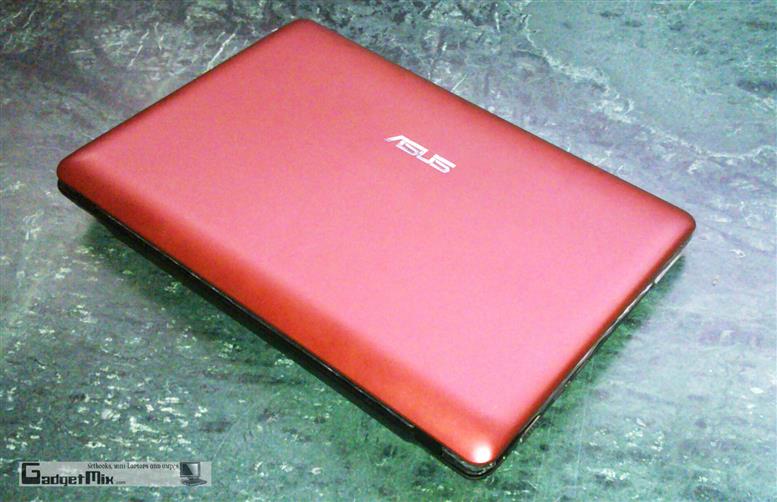
ASUS EEE 1008HA REVIEW – Everything you need to learn about the EEE 1008A!
By Kamal DS on August 03, 2009  |  Comments 14

ASUS EEE 1008HA REVIEW – Everything you need to learn about the EEE 1008A!

Alright, so we have completed doing various tests on the EEE 1008HA and we have developed a both love and hate relationship with this slim netbook from ASUS.

Acer AO751H REVIEW (same as Acer LT3000) (Acer Aspire One 751)
By Kamal DS on May 28, 2009  |  Comments 71

Acer AO751H REVIEW (same as Acer LT3000) (Acer Aspire One 751)

With so many netbook manufactures now breaking into the 10-inch+ screen limit, Acer was no way going to left behind in the business where it actually rules.The Acer A0751H is the first Acer Aspire One to sport an Intel Atom Z 520 processor that is clocked at 1.3GHz. However, the best part of this netbook is its resolution: 1366 x 768 px, which gives it an obvious edge over its competitors. So, was it able to impress us?

Read the review to find out!

ASUS EEE S101H REVIEW – Detailed!
By Kamal DS on May 03, 2009  |  Comments 22

ASUS EEE S101H REVIEW – Detailed!

After the sweet success of ASUS EEE S101, ASUS rolled out a hard disk version of it, the EEE S101H. It is built along the lines of S101. It is just 2.5cm thin; weighs just 1.1kg and its metallic finish makes it perfect for making a style statement. But, do not go swayed away by its looks, it is pretty powerful too. Read the full review to find more about it!

ASUS EEE 1000HE review
By Kamal DS on April 18, 2009  |  Comments 25

ASUS EEE 1000HE review

ASUS EEE 1000H was one of the most successful netbooks ever rolled out by ASUS. The EEE 1000HE is the new netbook on the block which provides some noticable enhancements over the EEE 1000H.

Read this detailed review to find out more about EEE 1000HE!

April 18, 2009 | Kamal DS | Comments 25

ASUS EEE 1000HE review

ASUS EEE 1000H was one of the most successful netbooks ever rolled out by ASUS. The EEE 1000HE is the new netbook on the block which provides some noticeable enhancements over the EEE 1000H. Read this detailed review to find out more about EEE 1000HE!

Design

The design is similar to the its older sibling EEE 1000H.

1000HE with its brother 1000H

On the left side, you will find the kensington lock, USB port and earphone and microphone jack.

On the right side, you will find AC adapter port, VGA-out port, 2 USB ports and SDHC card reader

Screen

The screen size and the resolution is same as the older 1000H. I really expected the ASUS to bump up the resolution a little bit, but they have changed absolutely nothing as compared to the 1000H in terms of display size or resolution. The screen size is 10.2-inch and the resolution is 1024 x 600.

The bezel around the screen is shiny. The 1000H has a matte bezel. Below the screen you will find two microphones (yes, two!).

CPU

The ASUS EEE 1000HE comes with a newer atom processor which is clocked at 1.66GHz, which makes it mind-blowing 60MHz faster than the now old N270 Atom processor. When we did a comparison of N270 and N280 processor, the N280 processor did turn out to a bit faster in ALU and FPU calculations.

Let the benchmarks say the rest:

Crystal Mark

Crystal Mark

Crystal disk mark

Crystal disk mark

Keyboard

The keyboard found in 1000H was already so nice. The new keyboard found on the EEE 1000HE has been a mixed blessing for me so far. Although I really like the new shift key that is now a little bigger than the one found on the older EEEs like 1000H, 90x and 70x, but the fact that it is not on the extreme right like ‘normal’ laptop keyboards is actually forcing me to change my not-so-easy-to-change typing habits. I guess it will take few more days for me to get used to the keyboard. Tactile feedback is fine and the chicklet keys take very less effort to register a key press.

The arrow keys are much smaller as compared to the older 1000H. They do take some time to get used to.

One think the competition has done right in terms of keyboard is by providing dedicated page up and page down buttons. Since the first EEE model and till now, no EEE has got dedicated page up and page down buttons, which are so extensively used while browsing the web and working with documents.

Touchpad

The touchpad is big and supports multi-touch gestures. For example: you can use two finger gesture to do the scrolling.

The left and right mouse buttons also take less force to register press as compared to the stiff ones found on the EEE 1000H.

Portability

The ASUS EEE 1000HE weighs at 1.45 kg which is same as the older 1000H. The 1000H was one of the heaviest netbooks around and this is no different. I do not think this should be problem for anyone who is more concerned about battery life.

Speakers

The speakers feel very similar to the one found on the EEE 1000H. They are quite loud when compared to other netbooks/laptops. However, when you put it on your lap, the sound gets muffled as they are located beneath the trackpad.

Coolness and Fan

The unit remained very quite even after 30 minutes of surfing. After that, it did kicked in but got quite again after 10 seconds.

Upgrading

The EEE 1000HE is very easy to upgrade. Just use the screwdriver to unscrew the two screws and you will have access to the HDD and RAM.

1000HE and 1000H

Battery Life

The EEE 1000HE comes with a 6-cell 8700mAh battery. Now, this is a huge one when compared to most of the netbooks currently in the market.

I was able to squeeze out nearly 7.5 hours with both WiFi and BT off while working on my office documents (using Microsoft Office 2007). This is no where close to 9.5 hours which the ASUS is claiming, but I got no reason to complain when my portable device is giving me 7+ hours of usage.

While using Wifi, I was able to get 6.5 hours, which is still really nice. I used firefox as my web-browser and the brightness was set to 3 notches above the lowest brightness settings. It is obvious that brightness and wifi are two huge suckers for the batter juice.

It took me nearly 4.5 hours to get it 80% charge, but one needs to understand that we are charging a HUGE battery!

The battery life is simply mind-blowing. Although, I do not think I’m ever going to reach 9.5 hours battery life, but I still was able to get nearly 7 hours with heavy usage.

Are the EEE 1000H and EEE 1000HE batteries interchangeable?

Well, from outside both of them look so similar. It occurred to me, if it would be possible to swap their batteries. The answer is yes. The 8700mAh battery fit inside the EEE 1000H without any problems but I could not lock the battery latch. The 6600mAh battery of the EEE 1000H was also able to fit inside the EEE 1000HE and I was even able to lock the battery latch. Both units performed fine with each other’s battery.

Power brick

The power brick is exactly the same as the EEE 1000H and similar models (904HA, 1002HA, S101, S101H etc).

Bundled accessories

The ASUS has bundled a neoprene bag. Sadly, I simple do not carrying around in this bag as this seems to be made of very poor material. The one that came with the older EEE 1000H was much sturdy and was also made of better material.

updated:

Screen comparison of 1000H and  1000HE:

The screens looks very much identical. However, the screen of 1000HE does feel to have a little more contrast.

The one shown on the left is 1000HE and one of the right is the 1000H

Pros:

  • Amazing battery life
  • Overall sturdy built
  • HDD and RAM easily upgradable
  • Better keyboard for some, but not for me. I’m still happy with non-chicklet keys
  • Good performance with XP
  • 10GB EEE storage
  • Some people will appreciate the Chicklet keys

Cons:

  • No multi card reader
  • Heavy as compared to other netbooks
  • Right shift should be the extreme right, but it is not.
  • Not so sleek as the other newer EEEs like S101H and EEE 1002HA
  • Poor quality bundled case

[ASUS EEE 1000HE homepage]

Related Content

ultimate netbook accessories
Categories :NetBook, featured, review-hardware
Related words : , , , , , , , , , , , , , , , , , , , , , , , , , , , , ,

Sign up to the Gadgetmix Newsletter (free) for news and reviews mailed directly to your mailbox CLICK HERE

25 Responses to “ASUS EEE 1000HE review”

  1. Herbert says:

    Kamal, I’ve eee 701 and I am considering to upgrade. What do you suggest: 1000H or 1000HE? Also, what is the maximum capacity of RAM that you can use there

  2. eee_geek says:

    I guess you can use upto 2GB ram

  3. Kamal DS says:

    Yes, eee_geek is right. You can use upto 2GB of RAM.

    I would suggest you to go for 1000HE due to its extra-ordinary battery life

  4. Gary says:

    Excellent review Kamal. One question, can I use any HDD in it?

    Thanks in advance

  5. Carmen says:

    I guess it won’t be hard to achieve 9 hour mark with that 8700mAh battery. I can get 7 hours on my 1000H with BT, WIFI, USB all turned off and setting the brightness to low. So, 9 hours is not a distant dream for me.

  6. Minnie says:

    How is the wifi signal strength? If it is same as 1000H, then I would buy it. Some netbooks have weak wifi cards, you see.

  7. MichealG says:

    I am yet to buy a netbook. Just stumbled upon this mini-laptop and 7+ hours battery life made me interested into this thing. I want to know if it can handle photoshop (just some light work) and firefox/chrome nicely

    thanks

  8. U_dont says:

    Great review. Do you recommend this to bloggers who write a lot of content?

    Also, can you connect a stereo BT headphones to it?

  9. Kamal DS says:

    @ U _dont: Yes, I would recommend it to the bloggers.

    And yes, you can connect your A2DP headphones to it.

    @ MichealG: Yes, it performs great in those tasks. That is the reasons these mini laptops are called netbooks ;)

    I run Photoshop CS3 on it without any problems

  10. Kamal DS says:

    @ Minnie: Wireless signal strength is same as 1000H

    @ Carmen: 7 hours on 1000H. That is something tough for me to achieve.

    @ Gary: Yes, almost any laptop HDD would work in 1000HE

  11. Peter334 says:

    I’ve got the white 1000HE, because Fingerprints are a lot less obvious on a white surface. You can see how a black shiny surface seems to attract fingerprints in the last picture of the review.

    The build in 1GB RAM was very easy exchangeable with a 2 GB Module. WinXP say thanks :-)

    I read about a guy who exchanged the HD for a 500GB model without any complications. He just cloned the original drive to the new one and then used a partition tool to expand the partition to maximum.

    Acording to another review, the maximum brightness of the display seemed to be lower than with the 1000H. But there is a little freeware tool named eeectl for tweaking the brightness quite a bit.
    Asus hasn’t made a comment about that tool yet, as far as I know. So use at own risk.

  12. Kamal DS says:

    Peter: I’ve updated the review with the screens of both of them at full brightness.

    My finding is somewhat different. 1000HE seems to have more contrast. Brightness of both of them is almost same

  13. Steve says:

    Hello Kamal

    Have you tried to run vista on your HE?

    I just got mine yesterday and want to put it on, do you think it will be fine with the drivers ect? I’ll be upgrading the ram to 2gb and hdd to 500gb before i do it.

    Thanks for the fantastic view! you convinced me to buy it and i love it!

    Steve.

  14. Kamal DS says:

    I have run Vista on my EEE 1000H and it is comparatively slower than the XP. I’ve 2GB RAM in my EEE 1000H.

    I would suggest you to go for Windows 7 instead. Install the drivers from the CD under XP compatibility mode and you should be fine with 7.

    Do not install the graphics driver from the CD though. Download it from this link:

    http://alturl.com/2f8n

  15. Vin says:

    Hi,

    Have you used it with Tata Photon+ wireless connection?

    Does it load graphic heavy sites faster?

  16. [...] Read More By Kamal DS on April 18, 2009  |  Comments 15 [...]

  17. arun says:

    how will you install and re install xp if you are not having an optical drive?

  18. Kamal DS says:

    You can install via usb drive. I always do that

  19. [...] Read More By Kamal DS on April 18, 2009  |  Comments 18 [...]

  20. [...] After the sweet success of ASUS EEE S101, ASUS rolled out a hard disk version of it, the EEE S101H. It is built along the lines of S101. It is just 2.5cm thin; weighs just 1.1kg and its metallic finish makes it perfect for making a style statement. But, do not go swayed away by its looks, it is pretty powerful too. Read the full review to find more about it! By Kamal DS on April 18, 2009  |  Comments 19 [...]

  21. [...] After the sweet success of ASUS EEE S101, ASUS rolled out a hard disk version of it, the EEE S101H. It is built along the lines of S101. It is just 2.5cm thin; weighs just 1.1kg and its metallic finish makes it perfect for making a style statement. But, do not go swayed away by its looks, it is pretty powerful too. Read the full review to find more about it! By Kamal DS on April 18, 2009  |  Comments 20 [...]

  22. [...] After the sweet success of ASUS EEE S101, ASUS rolled out a hard disk version of it, the EEE S101H. It is built along the lines of S101. It is just 2.5cm thin; weighs just 1.1kg and its metallic finish makes it perfect for making a style statement. But, do not go swayed away by its looks, it is pretty powerful too. Read the full review to find more about it! By Kamal DS on April 18, 2009  |  Comments 21 [...]

  23. [...] After the sweet success of ASUS EEE S101, ASUS rolled out a hard disk version of it, the EEE S101H. It is built along the lines of S101. It is just 2.5cm thin; weighs just 1.1kg and its metallic finish makes it perfect for making a style statement. But, do not go swayed away by its looks, it is pretty powerful too. Read the full review to find more about it! By Kamal DS on April 18, 2009  |  Comments 22 [...]

  24. [...] After the sweet success of ASUS EEE S101, ASUS rolled out a hard disk version of it, the EEE S101H. It is built along the lines of S101. It is just 2.5cm thin; weighs just 1.1kg and its metallic finish makes it perfect for making a style statement. But, do not go swayed away by its looks, it is pretty powerful too. Read the full review to find more about it! By Kamal DS on April 18, 2009  |  Comments 23 [...]

  25. [...] After the sweet success of ASUS EEE S101, ASUS rolled out a hard disk version of it, the EEE S101H. It is built along the lines of S101. It is just 2.5cm thin; weighs just 1.1kg and its metallic finish makes it perfect for making a style statement. But, do not go swayed away by its looks, it is pretty powerful too. Read the full review to find more about it! By Kamal DS on April 18, 2009  |  Comments 24 [...]

Leave a Reply

UMPC Topsites