RSS RSS twitter
June 01, 2012 | Paul Merak | Comments 0

Dell Alienware M17x – Review

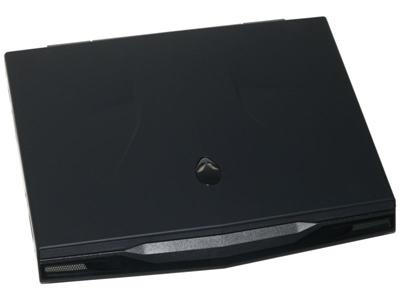
Dell Alienware M17x

As with all Dell Alienware notebooks, there are a bewildering array of config options for the updated Alienware M17x is available on Dell’s website. Choose from Ivy Bridge processors – 3610QM, 3720QM or 3820QM, all eight-threaded, and the base model’s 40nm Fermi-architecture GTX660M can also be up-specced to a 28nm Fermi-architecture GTX675M. The flagship config Alienware M17x comes with an AMD Radeon HD7970M GPU.

Alienware provides an mSATA bay and a pair of normal 2.5-inch bays, with various RAID-0 set-ups on offer. Then there are HD+ 1600 x 900px displays or full HD 1920 x 1080px screens, and there are even 120Hz versions for 3D enthusiasts. Optical drive is an easy choice – DVD burner or Blu-ray combo. Gamers will likely want WiFi configured to Killer Wireless-N 1103.

The Alienware M17x measures 410mm x 304mm x 46mm and weighs 4.4kg. Offered in either understated Stealth Black or bold Nebula Red. Design-wise it’s very similar to the last-gen M17x with with extra grilles in front. Bold lines, the same other-wordly appearance as before, and the same impeccable build quality. The rubber coating on the lid and wrist rest add to the notebook’s allure, and help keep it smear and fingerprint-free.

Can’t say the same for the glossy 17.3 full HD screen though. Of course, colors display vibrant and sharp thanks to the combination of good brightness (260 nits) and decent deep tones (0.5) to give a respectable contrast ration of 570:1. That’s fine for gamers and and multimedia users but the glossy finish and middling blacks(by artists standards) might put off professionals, especially since the sRGB spectrum is not quite covered.

But this is a luxury notebook; it aims at multimedia or hardcore gaming use, not mobile workstation users.

dell alienware m17x keyboard

The keyboard is not really meant for extended typing sessions – its 12mm x 13mm keys are a bit narrow, though gamers will generally have their trigger fingers poised above the exact key they need, or very close. For text input, it all seems a bit cramped, with the constant worry that the next typo is a keypress away. Though the dedicated number pad may come in handy for late night data entry – at a pinch! The keyboard, like the touchpad, is backlit, with four separate zones which can be lit in your own choice of palette. That touchpad is ultra-smooth for easy glide, and multi-touch gestures execute flawlessly. Its quite spacious too, at 100mm x 55mm.

The two Klipsch speakers and Soundblaster Recon3Di technology incorporate for THX TruStudio Pro, and there’s also scout mode for hunting down enemies more efficiently.

Dell Alienware M17x - left side
Dell Alienware M17x - right side

Portwise the fourth-generation M17x gets an upgrade to its USB port selection – now there are four USB-3 ports und one USB-2, where the Sandy Bridge Version featured only three USB-3s and a couple of USB-2 sockets. For Video output there are VGA, HDMI und miniDisplayPort interfaces, and an HDMI-in enables the glorious display to be used for other devices. Four SurroundSound audio jacks are better than is offered by such games machines as the Schenker XMG 702 or MSI GT70. Net connectivity comes on the base model via WiFi-n und Bluetooth 4.0.

But enough small talk. How does the M17x measure up in games benchmarks? The scores here are for the M17x with a 2.3GHz i7-3610QM CPU paired with a Radeon HD 7970 graphics card, and we think the top GPU justifies the extra outlay. Battlefield 3, Dirt 3, Alan Wake, Risen 2: Dark Waters – they all play smoothly in full HD 1920 x 1080p at ‘ultra’ settings smooth. With 2x or 4x antialiasing, too – the only title which cannot be played at all the highest settings is Metro 2033. The Alienware M17x is simply streets ahead of the competition. Everything else is child’s play for the Alienware M17x R4 – graphically-intense programs and ultra-poly-multi-tabbed browsing is a breeze.

Battery life delivers 4hrs-plus of WiFi web browsing, thanks to a 9-cell battery and Optimus switching hibernating the dedicated graphics card when it’s not needed. Which is most of the time when doing anything other than gaming, since the Intel HD4000 intergrated graphics solution rivals entry-level graphics cards for capability.

In short, the Alienware M17x Ivy Bridge version is a worthy upgrade to the Alienware platform. Notebookcheck gives it numero uno followed by Asus G75V, then Schenker XMG P702 and MSI GT783 notebooks.

Related posts:

  1. Schenker XMG P702 – Review


Related words : , , , , ,

Sign up to the Gadgetmix Newsletter (free) for news and reviews mailed directly to your mailbox CLICK HERE

Leave a Reply

Visit Us On TwitterVisit Us On FacebookVisit Us On Google PlusCheck Our Feed