
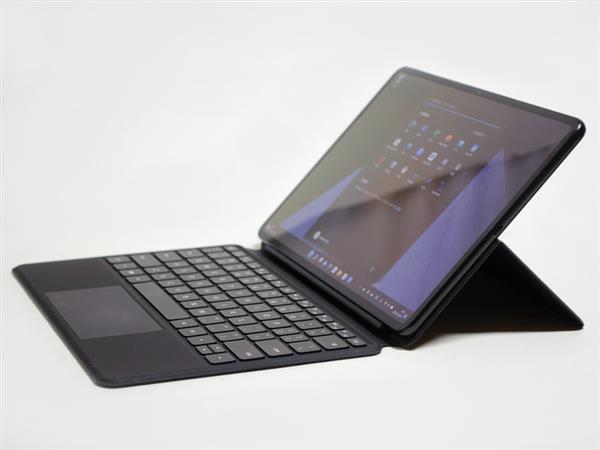
The Huawei MateBook E introduced this time is a 12.6-inch 2in1 with a detachable keyboard that also supports pens. The processor to be installed is i3 or i5 of the 11th generation Tiger Lake platform. Up to this point, it is fairly common, but the feature is that the 12.6-inch panel is an OLED with WQXGA display packing 2,560 x 1,600 pixels.
MateBook E Review
Although smartphones and Android tablets are already OLEDs above the middle range (some low-end ones), they are still a minority in the PC world. Therefore, this is the biggest feature. The appeal of OLED is that it has a good black color and a wide color gamut. At first glance, it can be distinguished from an ordinary LCD panel.
As I wrote earlier, while there are models equipped with Core i3 and i5, the latter 8GB / 256GB arrived at hand. The main specifications are as follows.
Specifications
Processor Core i5-1130G7 (4 cores 8 threads /0.8 (1.8) -4.0GHz / cache 8MB / cTDP-down 7W / up 15W)
memory 8GB or 16GB / LPDDR4x
storage NVMe SSD 128GB / 256GB / 512GB
OS Windows 11 Home (64bit)
display 12.6-inch OLED 2,560 x 1,600 (16:10), gloss, brightness up to 600 cd / sq.m
Graphics Intel Iris Xe Graphics, Type-C
network Wi-Fi 6 compatible, Bluetooth 5.1
Interface Thunderbolt 4×1, 8MP front / 13MP rear webcam, 4 speakers / 4 microphones, audio input / output
Battery 42Wh
Size / weight (for tablet) 306 x 215 x 146 mm (width x depth x height), weight 709 g
others HUAWEI Smart Magnetic Keyboard (Core i5 model only comes with Japanese layout). Optional pen support

The processor is the 11th generation Tiger Lake Intel Core i5-1130G7. It has 4 cores and 8 threads, and the clock is from 0.8GHz (cTDP-down) /1.8GHz (cTDP-up) up to 4GHz. The cache is 8MB, cTDP is down 7W, up 15W. The Core i3-1110 G4 is also available as a lower model.
Memory is 8GB or 16GB of LPDDR4x. Storage is 128GB / 256GB / 512GB of NVMe SSD. This time I received 8GB / 256GB. The OS is Windows 11 Home. Since it was 21H2, I applied and evaluated Windows Update within that range. There seems to be Windows 11 S depending on the combination of processors and so on.
The display is 12.6-inch OLED. 2,560 x 1,600 (16:10), gloss, brightness up to 600 cd / sq.m. It will be a fairly high resolution OLED. Also, 16: 9 is narrow for both tablets and laptops, so 16:10 is appreciated. The graphics are Intel Iris Xe Graphics with a built-in processor. Thunderbolt 4 is available for external output. It also supports pens as an option.
The network supports Wi-Fi 6 and Bluetooth 5.1. Other interfaces are Thunderbolt 4×1, 8MP front / 13MP rear webcam, 4 speakers / 4 microphones, audio input / output. In other words, the connection to peripheral devices is one of Thunderbolt 4. This also serves as a charge, so even if you insert one USB memory, you will need a Hub etc., which is a little troublesome.
The size of the tablet is 306 x 215 x 146 mm (width x depth x height), and the weight is 709 g. Built-in 42Wh battery.
Keyboard
The price is a little confusing, but the Core i3 model does not come with the HUAWEI Smart Magnetic Keyboard, and it costs 590 dollars for 8GB / 128GB ($700 for the keyboard set). The Core i5 / 8GB / 256GB model is included and costs $1000. Core i5 will be 2in1 like a notebook PC, but if you mainly use it like a tablet, it may be at this price without Core i3 / keyboard.
I received the US layout, but the domestic sales are in Japanese. As you can see from the picture of the door, it will be placed directly on the desk etc.

Actually measured about 18 mm. The area around the [Enter] key is narrow. Due to the specifications, the stroke is 1.3 mm.
Design
The housing is a metallic dark gray and is quite cool. The actual measurement is 716g for the main body only. The iPad Pro 12.9 weighs 682g, so it’s a little heavier than that, but the 12-inch class would be around 700g. With a keyboard, the total weight is 1,152g. It’s a little over 1kg, but considering the specs, it’s still lighter.
The front is a webcam on the center of the panel. The screen occupancy rate is 90%, so the edge is narrow. Volume ± button on the top side, power button and 3.5mm jack on the left side. The right side is Type-C only. There are contacts for the keyboard on the bottom side. The included AC adapter is 65W with a size of about 6 x 6 x 2.8 cm, a weight of 151 g, an output of 5V / 2A, 9V / 2A, 12V / 2A, 15V / 3A, and 20V / 3.25A. Since it is a PD, it can be charged if it is the same 65W type.
Display
The 12.9-inch display is easy to use with a 16:10 aspect ratio both vertically and horizontally. The tightness of black is good, and in addition, there are no complaints about color development, contrast, brightness, and viewing angle. As expected it is OLED. You can see that the colors are good from the photos posted.
According to the company, TÜV Rheinland’s Full Care Display 2.0 certification has been obtained. Not only low blue light, but also pixel density, brightness, color uniformity, reflection of ambient light, etc., have passed more than 10 tests.
When the characteristics were measured using i1 Display Pro, the maximum brightness was 319 cd / sq.m. The brightness of 120 cd / sq.m, which is said to be suitable for viewing photos, is 156 cd / m2 for -3 and 117 cd / m2 for -4. Therefore, the former is used for measurement. Since the black brightness is OLED, it is completely black at 0.000 cd / m2. However, the linearity was rather disturbed, and in addition, it was quite blue before the correction.
The HUAWEI Smart Magnetic Keyboard does not have a mechanism to tilt the keyboard surface, and it is placed on a desk or the like. I don’t feel the keystrokes that are typical of this type, and the stroke is neither too shallow nor too deep (1.3mm in terms of specifications), which I personally like. The key pitch is slightly narrower only around the [Enter] key, but the main key is about 18mm. However, since the US layout arrived this time, it may be different if it is a Japanese layout.
Benchmark results
PCMark 10 v2.1.2548
PCMark 10 Score 3,830
Essentials 8,491
App Start-up Score 11,476
Video Conferencing Score 7,599
Web Browsing Score 7,022
Productivity 5,575
Spreadsheets Score 4,873
Writing Score 6,380
Digital Content Creation 3,221
Photo Editing Score 5,359
Rendering and Visualization Score 1,875
Video Editing Score 3,328
PCMark 8 v2.8.704
Home Accelarated 3.0 3,064
Creative Accelarated 3.0 3,637
Work Accelarated 2.0 2,468
Storage 5,070
3DMark v2.22.7336
Time Spy 731
Fire Strike Ultra 547
Fire Strike Extreme 1,018
Fire Strike 1,931
Sky Diver 6,113
Cloud Gate 8,227
Ice Storm Extreme 43,752
Ice Storm 50,454
Cinebench R23
CPU 1,977 pts (12th)
CPU (Single Core) 807 pts (9th)
CrystalDiskMark 6.0.0
Q32T1 Sequential read 3,546.784 MB / s
Q32T1 Sequential Light 2,351.448 MB / s
4K Q8T8 Random Read 586.563 MB / s
4K Q8T8 Random Light 631.074 MB / s
4K Q32T1 Random read 538.779 MB / s
4K Q32T1 Random write 418.538 MB / s
4K Q1T1 random read 52.077 MB / s
4K Q1T1 Random Light 217.002 MB / s