
RSS
ASUS EEE 1101HA review
By Kamal DS on December 07, 2009  |  Comments 8

ASUS EEE 1101HA review

The ASUS EEE 1101HA is the epitomization of good looks combined with great battery life. It carries the same Seashell design like its 10-inch brother, EEE 1008HA. But, the ASUS has entering a bit late into the 11.6-inch netbook market, but that does not make it an unattractive deal by any chance. It is a great netbook.

SONY VAIO X Review (Sony Vaio VPCX113KG/B) – Does this Size-Zero notebook/netbook has the X-factor?
By Kamal DS on November 13, 2009  |  Comments 44

SONY VAIO X Review (Sony Vaio VPCX113KG/B) – Does this Size-Zero notebook/netbook has the X-factor?

Have you been looking for an in-depth review of this highly anticipated netbook/notebook from SONY? How is the self-proclaimed size-zero, ultra slim notebook in terms of performance? Is its over-a-grand price worth it? Read the full review by clicking on the title!

Ubuntu 9.10 Karmic Koala Review
By Kamal DS on October 31, 2009  |  Comments 18

Ubuntu 9.10 Karmic Koala Review

Ubuntu 9.10 is the latest Ubuntu’s release that brings in myriad of fixes and new features that make it the most user-friendly Linux OS ever made. GadgetMix.com spent quite a lot of time with the Alphas, Betas and the final release and we are impressed!

Read the full review by clicking on the title!

Netbook Car Mount REVIEW – for netbooks with 7-inches to 13-inches – Ultimate Netbook
By Kamal DS on October 10, 2009  |  Comments 1

Netbook Car Mount REVIEW – for netbooks with 7-inches to 13-inches – Ultimate Netbook

People use their netbooks for a variety of purposes. Some use it for Internet surfing on-the-go and some for basic office editing. There are many of us, who use these nice little devices for GPS navigation. Netbook screens are perfect for this as they are smaller than the big and bulky notebooks and have bigger displays than the usual in-car GPS devices.

Read review of this wonderful car mount from ultimate-netbooks!

ASUS EEE 1008HA REVIEW – Everything you need to learn about the EEE 1008A!
By Kamal DS on August 03, 2009  |  Comments 17

ASUS EEE 1008HA REVIEW – Everything you need to learn about the EEE 1008A!

Alright, so we have completed doing various tests on the EEE 1008HA and we have developed a both love and hate relationship with this slim netbook from ASUS.

Acer AO751H REVIEW (same as Acer LT3000) (Acer Aspire One 751)
By Kamal DS on May 28, 2009  |  Comments 76

Acer AO751H REVIEW (same as Acer LT3000) (Acer Aspire One 751)

With so many netbook manufactures now breaking into the 10-inch+ screen limit, Acer was no way going to left behind in the business where it actually rules.The Acer A0751H is the first Acer Aspire One to sport an Intel Atom Z 520 processor that is clocked at 1.3GHz. However, the best part of this netbook is its resolution: 1366 x 768 px, which gives it an obvious edge over its competitors. So, was it able to impress us?

Read the review to find out!

sony vaio x review
November 23, 2009 | Kamal DS | Comments 9

Google Chrome OS/Chromium OS (beta) quick review

Soon, we will see myriad of manufactures coming up with Chromium netbooks: the netbooks that run Google Chrome OS. We managed to get hold of a beta copy from you-know-where and tried it using Virtual machine.
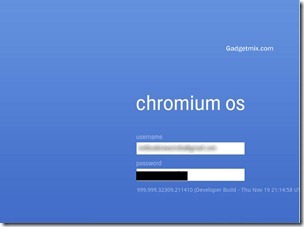
Here is the login screen of the Chrome OS. Google has kept it simple. You need to have a Gmail account in order to login. After all, this is a Google OS and to use Google Services like Gtalk, Google Docs and Gmail, you need to have a Google account.
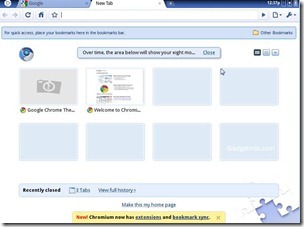
2

No “submit” button or cancel button. Just press enter to log-in. Note that we were on a WiFi network when testing Chrome OS.

6

It opens your gmail immediately after you log-in.
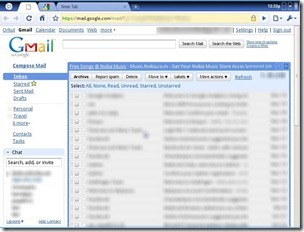
1

Everything is organized into tabs. At first glance, it would look like a plain-jane web-browser to anybody. But, it is actually not. It is a full-brown OS whose image file is well over 700MB.

3

Cloud Apps

chromium-os

Chrome OS settings

Here, you can manage the touchpad’s sensitivity and speed.
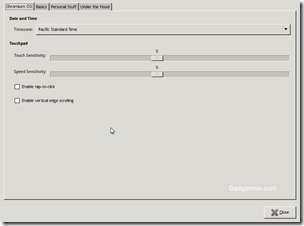
4

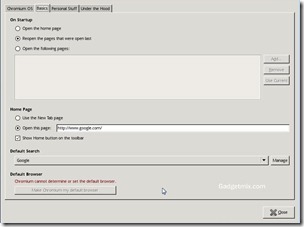
Oddly, in the below screenshot, it says that Google cannot determine the default browser. :)

5

The start up was somewhere between 10 seconds. It did not feel speedy, but then we were testing it under Virtual machine, which does not run operating systems at mind-blowing speeds.
Chrome OS will run on both ARM and X86 infrastructures which means that it could make its way to MIDs as-well-as phones. This increases the probability of acceptance of Chrome OS by the OEMs and manufactures. The Chromium OS is cool and fresh. With a push from a huge company like Google, it won’t be a tough task for Google to make this project a success

Related Content

ultimate netbook accessories

Related words : , , , , , , , ,

Sign up to the Gadgetmix Newsletter (free) for news and reviews mailed directly to your mailbox CLICK HERE

9 Responses to “Google Chrome OS/Chromium OS (beta) quick review”

  1. [...] days back, we did a review of Google Chrome OS (Beta). That installation of Google Chrome took quite a lot of space. To those who were running it [...]

Leave a Reply

UMPC Topsites